I've decided to rebrand UltraMobileHealth.com as MobileHealthComputing.com
This new URL more accurately describes the purpose of the website. Instead of focusing entirely on ultra-mobile PCs, I will be evaluating laptops/notebooks, tablet PCs, netbooks, MIDs, and other mobile computing platforms.

Showing posts with label UMPC. Show all posts
Showing posts with label UMPC. Show all posts
Sunday, April 26, 2009


Monday, April 20, 2009
The Viliv S5 and the Buzz about UMPCs
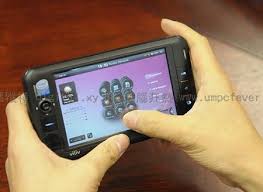
 Do you use an ultra-mobile PC (UMPC)? I'm not talking about those tiny netbooks that you see at Best Buy. I mean a touch-screen tablet that you can carry in your pocket. Tiny tablets are becoming more popular in the healthcare industry.
I love my OQO, but I fear that the company may not be here much longer. What will I do if I can't carry a full PC in my pocket? The Viliv S5 Premium may become the OQO replacement for those of us who have an OQO model 02. From a distance, it looks like the model 02. However, it's not a slider and it doesn't have a built-in keyboard. The Viliv S5 looks like a solid little device, but who's heard of Viliv? Viliv is a Korean company that creates ultra-mobile PCs like the S5 which fits in the palm of your hand. Would you pay $599 for this computer? You won't find it at Best Buy, but you can get one at Dynamism. This little computer has generated a lot of buzz recently and it may be a great little mini table for those of you who need a full PC but don't need a small built-in keyboard like those found on netbooks.
Sunday, April 19, 2009
Windows 7 Much Better than Vista and XP

I didn't have high hopes for Windows 7. I didn't think that Microsoft could build an operating system that was more efficient than XP for slower machines like ultra-mobile PCs (UMPCs). For these reasons, I've been running Windows XP on my Samsung Q1 Ultra which has a very slow processor (single core, 800 MHz). It's not like my Lenovo Thinkpad X200 Tablet that has a blazing Intel Core 2 Duo processor.
My hat's off to you Microsoft. You've learned from your mistakes (and failures) on Vista and you've created a great operating system with Windows 7. I'm very impressed by the way that Windows 7 is running on my Ultra-Mobile PC (UMPC). I had tried a few of the earlier builds of Windows 7 on my Samsung Q1 Ultra and they were not better than Vista. However, the latest build of Windows 7 (build 7077) has been fast, efficient, and very responsive. If you're still running Windows XP, I urge you skip Vista and go to Windows 7.
Tuesday, April 14, 2009
Experimenting with Windows 7 (Build 7077)
I have to admit: I did not have high expectations for Microsoft Windows 7. I had the chance to test some of the earlier beta versions of Windows 7 (including the public beta) and they didn't really impress me. However, I recently installed the latest build (build 7077) and I have to say that I've been very impressed. I installed this version on a convertible tablet (Fujitsu) and an ultra-mobile PC (Samsung Q1 Ultra) It's very fast and responsive and it doesn't lock up like Vista. If you have an older notebook/laptop, you may want to give it a try.
Monday, April 13, 2009
Nokia RX-51 MID
I admit that whenever I go to the airport, I swing by the technology stores to browse gadgets and play with the Nokia N810 tablet Mobile Internet Device (MID). The N810 is a really nice device that runs a simple Linux OS and has a full-featured web browser. It doesn't support business applications such as Microsoft Office, so it really is a device intended to be used for digital media and web browsing. I never purchased one because I already have so many gadgets that it would be impossible to justify.
I think the new Nokia RX-51 is going to be a really nice MID. In fact, Nokia has been very receptive to feedback and improved their tablet by adding a slide-out keyboard, internal GPS, and additional capabilites. What more can they do? Let's see what Nokia delivers later this year with the RX-51. I'm optimistic that it will be a really versatile device that may help physicians who are on-call and who need to have Internet access while they're out of the house. No one wants to carry around a laptop computer, but people may slip a tiny MID in their pockets.
I think the new Nokia RX-51 is going to be a really nice MID. In fact, Nokia has been very receptive to feedback and improved their tablet by adding a slide-out keyboard, internal GPS, and additional capabilites. What more can they do? Let's see what Nokia delivers later this year with the RX-51. I'm optimistic that it will be a really versatile device that may help physicians who are on-call and who need to have Internet access while they're out of the house. No one wants to carry around a laptop computer, but people may slip a tiny MID in their pockets.
Sunday, April 12, 2009
Windows 7 Build 7077 Runs Well on the Samsung Q1 Ultra UMPC

I'm happy to report that Windows 7 (build 7077) actually runs quite well on the Samsung Q1 Ultra UMPC (or Q1U, for those who like to differentiate them from the original Samsung Q1). I had tested a few of the earlier builds on my device and they did not work well at all. Somehow, the engineers at Microsoft have refined Windows 7 so that it actually runs fairly well on a slow machine that has an 800 MHz processor. I've been pleasantly surprised by Windows 7, so I've removed the Vista partition on my device and I've replaced it with Windows 7. I still have XP as a backup, but over the next few weeks I'll be mainly using Windows 7 to see how well it works on my mini tablet device.
Saturday, April 11, 2009
Windows 7 Build 7048 on Samsung Q1 Ultra UMPC
I decided to give Microsoft Windows 7 another try on my little Samsung Q1 Ultra UMPC. This is the older model that is thinner but also slower. The 800 MHz processor just isn't fast enough to run Vista effectively. I have to admit that Build 7048 is much better on the Q1 Ultra. I had tested some earlier builds and they just didn't work well at all.
There is another Build of Windows 7: Build 7077. I haven't had the chance to get my hands on that version yet, but that will be my next project (maybe I'll get to it next weekend). In the meanwhile, I will play around with Build 7047 this week and write about my findings. I've been running XP on my Q1 Ultra, but this week I plan to use Windows 7. My excitement for Windows 7 has been renewed. I'm not being overly optimistic (yet), but I am hopeful that this OS may replace XP on my Q1 Ultra.
There is another Build of Windows 7: Build 7077. I haven't had the chance to get my hands on that version yet, but that will be my next project (maybe I'll get to it next weekend). In the meanwhile, I will play around with Build 7047 this week and write about my findings. I've been running XP on my Q1 Ultra, but this week I plan to use Windows 7. My excitement for Windows 7 has been renewed. I'm not being overly optimistic (yet), but I am hopeful that this OS may replace XP on my Q1 Ultra.
Friday, April 10, 2009
Windows 7 Build 7077 on the Samsung Q1 Ultra UMPC

This is my next project: Windows 7 Build 7077 on my Samsung Q1 Ultra UMPC. This build 7077 is rumored to become the RC or Release Candidate version of Windows 7. The last time I installed Windows 7 on my Q1 Ultra, I was not impressed by the results. However, now that Microsoft has had a chance to fix some bugs, clean the code, and make some improvements, I'm willing to give it another try.
The future of medicine relys advances in technology such as mobile computers, UMPCs, gadgets, and other devices. It's exciting to see how the world of medicine is changing because of technology.
At what point is a PC too small?
We live in a world of mobile technology. We see PDAs, BlackBerrys, iPhones, Smartphones, iPods, and all sorts of other mobile devices. Computers are also getting smaller and we see young people using UMPCs, netbooks, micro PCs, and other miniature computers. But at what point is the PC so small that you fail to be productive? At what point does the small size hinder your ability to do what you need to do? How do you balance size, weight, and functionality? After all, you can probably find a PC in a very small size, and then if you look some more, you can probably find another one that's 25% larger. So how should a physician, pharmacist, or nurse decide on the size of that mobile PC when working in the clinical setting? At what point is an ultra-mobile PC too small?
Wednesday, April 8, 2009
MobileHealthComputing.com
I secured a new URL today: http://www.mobilehealthcomputing.com/
I've been writing about UMPCs (ultra-mobile PCs), netbooks, MIDs, PDAs, Smartphones, iPhones, iPods, tablet PCs, and other mobile devices for a while now. I thought it was time to get a new URL for my old blog that focuses on these gadgets and mobile technology in healthcare. Welcome to the world of cloud computing.
I've been writing about UMPCs (ultra-mobile PCs), netbooks, MIDs, PDAs, Smartphones, iPhones, iPods, tablet PCs, and other mobile devices for a while now. I thought it was time to get a new URL for my old blog that focuses on these gadgets and mobile technology in healthcare. Welcome to the world of cloud computing.
Will OQO Make a Device Just for Healthcare?

Some people are eagerly awaiting the new OQO model 02+ which will be available very soon. I've been happy with my OQO model 02 (except I wish the fan was not so loud). This micro PC (or some may even call it an ultra-mobile PC or UMPC) has even been used in various healthcare settings. As younger physicians and other healthcare professionals get more familiar with mobile technology, tiny devices like the OQO will become more ubiquitous within the healthcare setting. The landscape of medicine is changing quickly, so gadget lovers should rejoice!
Spilled Water On a Laptop Keyboard
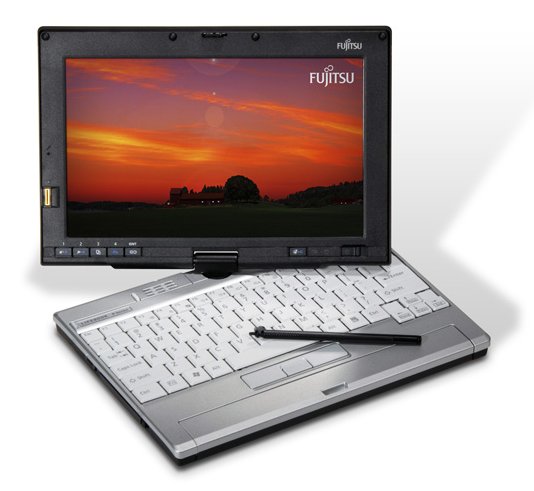
Well, I didn't spill the water. Thankfully, it wasn't my current Lenovo Thinkpad X200 Tablet PC (which has a spill-proof keyboard). It was my older Fujitsu P1610 Lifebook (which is a tiny device shaped like an UMPC and has a porous keyboard). I quickly unplugged it, removed the battery, and disassembled it to speed up the drying process. Thank goodness for online service manuals. I'll have to wait until tomorrow to see whether or not it will work. Fortunately, this device has become a recreational device (even though it is a convertible tablet PC with a passive touch screen). It's a great little computer that I used for a while, but I quickly realized that I needed a full-size keyboard to be more productive while I traveled for work. That's why I switched to the Thinkpad. I'll miss the p1610 if it dies, so I'm keeping my fingers crossed.
Friday, April 3, 2009
Are You Ready for Windows 7?
Have you tried Windows 7? I've been so unhappy with Vista that I've gone back to XP on most of my machines, including my mission critical PC. However, I'm quite intrigued by Windows 7. We will probably see a slim (or lite) version of Windows 7 for UMPCs and netbooks. I'm still running XP on my Samsung Q1 Ultra UMPC and my OQO model 02. Will Windows 7 be the ideal operating system for power PCs and ultra-low-cost machines?
In the healthcare field, XP will probably continue to dominate for a few more years because of the way many EHR/EMR systems are configured. Plus, you're often using older peripherals like scanners, printers, bar code scanning devices, and other devices. Some ambulatory EHRs have an EKG attachment that hooks up via USB. My guess is that most of those older connections will only work on PCs running XP. So, I think that health IT will lag behind other industries and we'll be using XP for a long time.
In the healthcare field, XP will probably continue to dominate for a few more years because of the way many EHR/EMR systems are configured. Plus, you're often using older peripherals like scanners, printers, bar code scanning devices, and other devices. Some ambulatory EHRs have an EKG attachment that hooks up via USB. My guess is that most of those older connections will only work on PCs running XP. So, I think that health IT will lag behind other industries and we'll be using XP for a long time.
Thursday, March 26, 2009
ZAGG Invisible Shield
If you need to protect your cell phone, PDA, smartphone, pager, iPod, iPhone, UMPC, or any other gadget, I would suggest the ZAGG Invisible Shield. They make some incredible device protectors that go beyond protecting the screen. I used to protect everything, but recently I've decided that it's not really worth the hassle because I switch gadgets too frequently (I admit I am trying to change that). I've also found that as long as I'm careful, I usually don't end up with any scratches. However, if you're clumsy, then you should definitely protect your device.
Saturday, March 14, 2009
Recharging Batteries in Seconds
What if you could recharge your dead cell phone battery in just a few seconds? It may be possible, thanks to some Course 3 (Materials Science and Engineering) researchers at MIT. We haven't seen any major breakthroughs in battery technology over the last decade. It's time we see a major improvement in rechargeable batteries.
Rechargeable batteries are also critical in the world of healthcare. Think about all those implanted cardiac defibrillators that rely on a tiny battery. Plus, other cardiac monitoring devices may use rechargeable batteries. As mobile computers like UMPCs become more commonplace in the medical arena, these devices rely on improved battery life.
Rechargeable batteries are also critical in the world of healthcare. Think about all those implanted cardiac defibrillators that rely on a tiny battery. Plus, other cardiac monitoring devices may use rechargeable batteries. As mobile computers like UMPCs become more commonplace in the medical arena, these devices rely on improved battery life.
Thursday, March 12, 2009
Panasonic CF-H1 Medical UMPC

Have you ever wondered why medical UMPCs (ultra-mobile PCs) have a built-in handle? When's the last time you saw a laptop that had a built-in handle? Maybe the One Laptop Per Child (OLPC) project?
Panasonic has the Toughbook CF-H1 Medical UMPC that looks like a very solid device. One of the nicest feature is the screen - it offers either a passive touch screen, or an active digitizer screen if you're using a special tablet pen. It looks like similar to the Motion C5 Mobile Clinical Assistant, but it looks like Panasonic took some of the feedback on the C5 and improved on the design. It's great to see UMPCs used in the healthcare industry. There is such a need for better medication management and monitoring that can all be done electronically now.
Saturday, March 7, 2009
Samsung Q1EX-71G UMPC


The Samsung Q1EX-71G UMPC is now on the Samsung website. CDW has it listed for $729.99 (the part # is NP-Q1EX-FA01US). Let's see what the reviews look like. When UMPCs first came out, I thought they would be great in the healthcare sector. Uptake has been slow with the UMPC, but the Motion C5 Mobile Clinical Assistant (MCA) tablet seems to have gained significant momentum in hospitals.
MobileBlogger for Windows Mobile
Do you blog when you're on the go? Many people are embracing microblogging these days. Twitter and other sites are becoming increasingly popular. Well, if you want to use your PDA/smartphone to blog when you're on the go, then try MobileBlogger. This application works on Windows Mobile devices (soon to be called the Windows Phone if you have a smartphone). I just can't type very fast on my mobile device (which is a Verizon XV 6800), so I prefer using my Samsung Q1 Ultra UMPC, my OQO model 02, or my Lenovo Thinkpad X200 Tablet. What about you? Do you blog on the go?
Thursday, March 5, 2009
Samsung Isn't Giving Up on the UMPC
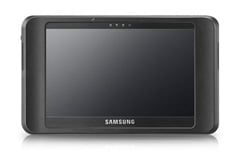
Samsung has a long history in the UMPC market. It was one of the first UMPCs that came out when the "origami project" was unveiled. Now, it is preparing to come out with the Q1EX (or NP-Q1EX). Who can keep up with this crazy naming convention?
Since I'm a Samsung Q1 Ultra UMPC user, I am probably quite biased. My tiny tablet has been a good, functional machine, but it's not a multi-tasking power PC. It has a very slow processor, but in exchange, I get long battery life. It's a compromise, but one that I'm willing to make. In the healthcare field, doctors need to carry these things around everywhere, so portability, durability, and weight are critical factors.
I'm curious to see what people will think about this new Samsung UMPC. The Q1EX lacks any buttons, knows, or keys on the front. They went with a very simple and basic tablet. It almost feels like they went backwards, but maybe they are depending on all the great features that will be included on Windows 7. Multi-touch? Capacitive touch? Doubtful.
Windows 7 Build 7048
There are more circulating rumors about Microsoft Windows 7 (in this case, it's about build 7048). Some don't seem to think that this is the Release Candidate version of Windows 7. It seems like Microsoft still has many things to fix before Windows 7 is ready for the world.
It's been refreshing to use XP on my main PC at work. I had Vista on it, but I was having so many issues that I finally decided to go to XP. I still have Vista on my Lenovo Thinkpad X200 Tablet, but that's primarily because the tablet features are so much better on Vista. Almost all those nice tablet features will also be found on Windows 7. I use the on-screen touch pointer quite a bit when I'm tapping on the screen. Otherwise, I rely on the active Wacom digitizer found on my stylus pen.
So are you excited about Windows 7? I used to have more enthusiasm, but recently that's dwindled significantly. I'd like to see Microsoft continue support for XP since it will probably still be the dominant operating system on netbooks and UMPCs (well, it will be for people who want a sleek, refined, stable operating system that takes up minimal hard drive space).
It's been refreshing to use XP on my main PC at work. I had Vista on it, but I was having so many issues that I finally decided to go to XP. I still have Vista on my Lenovo Thinkpad X200 Tablet, but that's primarily because the tablet features are so much better on Vista. Almost all those nice tablet features will also be found on Windows 7. I use the on-screen touch pointer quite a bit when I'm tapping on the screen. Otherwise, I rely on the active Wacom digitizer found on my stylus pen.
So are you excited about Windows 7? I used to have more enthusiasm, but recently that's dwindled significantly. I'd like to see Microsoft continue support for XP since it will probably still be the dominant operating system on netbooks and UMPCs (well, it will be for people who want a sleek, refined, stable operating system that takes up minimal hard drive space).
Subscribe to:
Posts (Atom)