If you want a chance to win a free Lenovo M90z all-in-one PC, then you're about to get another chance. Actually, you'll have 26 chances since there are 26 bloggers who are getting ready to give away a Lenovo M90z.
Some of our own contributors are running contests on their own blogs. Specifically:
Physician Mom (contest runs from Apr 16 to Apr 20)
Scrubd In (contest runs from Apr 17 to Apr 21)

Showing posts with label lenovo. Show all posts
Showing posts with label lenovo. Show all posts
Monday, April 18, 2011


Friday, December 10, 2010
There's still time to win five (5) Lenovo ThinkCentre M90z all-in-one PCs
Contest #2 will run until December 17. There's still time to win five (5) M90z all-in-one PCs for your organization. Make sure to share how you will use the touch-screen features on the M90z. More details here.
Monday, December 6, 2010
Congratulations to Becky Crim for winning a Lenovo ThinkCentre M90z!
Congratulations to Becky Crim for winning a Lenovo M90z all-in-one PC! Thanks to all those who participated! Contest #1 is now over on MedicineandTechnology.com, but there are a number of other websites that are still running giveaways.
Contest #2 will run until Dec 17. As a reminder, we are looking for organizations that can explain how they would like to use five (5) touch-enabled M90z all-in-one PCs. Click here to learn about Contest #2.
Contest #2 will run until Dec 17. As a reminder, we are looking for organizations that can explain how they would like to use five (5) touch-enabled M90z all-in-one PCs. Click here to learn about Contest #2.
Thursday, December 2, 2010
Enter to win up to five (5) Lenovo ThinkCentre M90z all-in-one PCs
 Win up to five (5) M90z PCs! There are 2 contests here: 1) Contest #1 is for a single Lenovo ThinkCentre M90z all-in-one PC; 2) Contest #2 is for a package of five (5) M90z units.
 Contest #1: Win a Lenovo ThinkCentre M90z All-In-One PC
Contest #1 dates: Dec 1-5, 2010.
Rules for entry:
- Register on Facebook and "Like" the Medicine and Technology page. You can qualify for multiple entries and increase your chances of winning by "liking" these other Facebook pages:
- Submit a single comment at the bottom of this blog post (starting on Dec 1) with the following information:
- Your full name (must be the same as your Facebook name).
- A brief explanation about how you'd like to use the M90z.
A single winner for Contest #1 will be selected at random on Sunday December 5, 2010 and will be contacted through Facebook. An announcement about the winner will be posted on the week of December 6, 2010. There are about 20 other blogs that are running similar contests, so maximize your chance to win an M90z by entering in all the contests.
Want another chance to win an M90z? Make sure to visit each of these sites during the promotional periods listed. Each website will be giving away a Lenovo M90z.
- Dec 1 - Dec 5: Medicine and Technology
- Dec 2 - Dec 6: Geeks Room
- Dec 3 - Dec 7: Neowin
- Dec 4 - Dec 8: Gear Diary
- Dec 5 - Dec 9: The Medical Quack
- Dec 6 - Dec 10: Digital Home Thoughts
- Dec 7 - Dec 11: Chip Chick
- Dec 8 - Dec 12: Teach 42
- Dec 9 - Dec 13: Slash Gear
- Dec 10 - Dec 14: Medgadget
- Dec 11 - Dec 15: Absolutely Windows
- Dec 12 - Dec 16: Small Business Trends
- Dec 13 - Dec 17: Cool Cat Teacher
- Dec 14 - Dec 18: Web 2.0 Classroom
- Dec 15 - Dec 19: The Healthcare IT Guy
- Dec 16 - Dec 20: Gear Live
- Dec 17 - Dec 21: Healthcare IT Strategy
- Dec 18 - Dec 22: Active Win
- Dec 19 - Dec 23: The Healthcare Blog
- Dec 20 - Dec 24: Practical Theory
Contest #2: Win a Package of Five (5) Lenovo ThinkCentre M90z All-In-One PCs for Your Organization
 Lenovo is also giving away three packages of five (5) M90z units each, destined for worthy social/non-profit causes such hospitals, clinics, schools, community centers, etc. Contest #2 is for organizations that could use five (5) touch-enabled all-in-one PCs. Three winning organizations will each receive a package of five (5) M90z units.
Contest #2 dates: Dec 1-17, 2010.
Rules for entry:
- Submit a single comment at the bottom of this blog post (starting on Dec 1) with the following information:
- The name of your organization.
- Your full name.
- A brief explanation about your organization and how you plan to use five (5) touch-enabled M90z all-in-one PCs. Please make sure to indicate if your organization is a non-profit, a medical, education, or community-focused organization.
- Send your contact information (including your name, your e-mail address, your organization's name, and your organization's mailing address) to: mdjoekim at gmail.com.
1) Organization must be located in the USA or Canada
2) Medical, education or similar community focus
3) Preference will given to non-profits or other types of organization dedicated to social good, community focus, etc.
4) Must have concrete application for 5 touch-enabled M90z units
3 winners for Contest #2 will be selected on these dates:
- Dec 6, 2010: Winner #1
- Dec 13, 2010: Winner #2
- Dec 20, 2010: Winner #3
The Lenovo ThinkCentre M90z is Lenovo's first all-in-one desktop for large enterprises, featuring professional-grade performance in a space-saving package.
Wednesday, December 1, 2010
5 days to win a Lenovo ThinkCentre #M90z All-In-One PC!
As a reminder, the contests to win up to five (5) Lenovo ThinkCentre M90z All-In-One PCs begins today!
There are 2 contests : 1) Contest #1 is for a single Lenovo ThinkCentre M90z all-in-one PC; 2) Contest #2 is for a package of five (5) M90z units.
Click here for more details.
There are 2 contests : 1) Contest #1 is for a single Lenovo ThinkCentre M90z all-in-one PC; 2) Contest #2 is for a package of five (5) M90z units.
Click here for more details.
Wednesday, November 24, 2010
Thursday, May 7, 2009
Rethinking the Kindle DX
I've been thinking about the rationale behind the Kindle DX. Why would Amazon want to release something so large and expensive? You could purchase a mobile computer (like a laptop or netbook) for the same amount. Does it really make sense to release an e-book reader that's so expensive?
The folks over at Amazon must really think that people are willing to replace textbooks with e-books. I'm a big fan of being paperless, but that's why I use my convertible Lenovo Thinkpad X200 tablet PC. I have a large color screen (12") and I can read all the PDFs I want to without panning, scrolling, etc.
How will the Apple iPad (I call it that right now, but it could end up being called the MacPad, MacTablet or iTablet) change the way people view these portable digital devices? Many people read on their iPhone. Will a larger tablet-sized gadget be preferred? How will doctors react to this surge of slate tablet-type gadgets? Will physicians become more inclined to embrace pen-based input and move away from the keyboard? Will Microsoft Surface reinforce the fact that you can be so much more efficient if you're using natural touch and finger gestures?
The folks over at Amazon must really think that people are willing to replace textbooks with e-books. I'm a big fan of being paperless, but that's why I use my convertible Lenovo Thinkpad X200 tablet PC. I have a large color screen (12") and I can read all the PDFs I want to without panning, scrolling, etc.
How will the Apple iPad (I call it that right now, but it could end up being called the MacPad, MacTablet or iTablet) change the way people view these portable digital devices? Many people read on their iPhone. Will a larger tablet-sized gadget be preferred? How will doctors react to this surge of slate tablet-type gadgets? Will physicians become more inclined to embrace pen-based input and move away from the keyboard? Will Microsoft Surface reinforce the fact that you can be so much more efficient if you're using natural touch and finger gestures?
Sunday, April 19, 2009
Multi-Touch Screens on a Tablet PC

The phrase "multi-touch" has gotten confusing in the tablet PC industry. My Lenovo Thinkpad X200 tablet is considered to have a multi-touch screen because I can use my active digitizer pen or my finger as an input device. However, I can't use two fingers on the screen because it is a passive screen (not a capacitive touch screen like the iPhone or BlackBerry Storm).
I was walking through Best Buy today and I played with the convertible tablet PC made by HP. It was the HP tablet TX2Z that features a capacitive multi-touch display (which means that you can use two fingers on the screen and perform gestures).
Windows 7 will include the capability to use some of those cool multi-touch gestures. Apple already leverages this technology on the iPhone and on their MacBooks.
Windows 7 Much Better than Vista and XP

I didn't have high hopes for Windows 7. I didn't think that Microsoft could build an operating system that was more efficient than XP for slower machines like ultra-mobile PCs (UMPCs). For these reasons, I've been running Windows XP on my Samsung Q1 Ultra which has a very slow processor (single core, 800 MHz). It's not like my Lenovo Thinkpad X200 Tablet that has a blazing Intel Core 2 Duo processor.
My hat's off to you Microsoft. You've learned from your mistakes (and failures) on Vista and you've created a great operating system with Windows 7. I'm very impressed by the way that Windows 7 is running on my Ultra-Mobile PC (UMPC). I had tried a few of the earlier builds of Windows 7 on my Samsung Q1 Ultra and they were not better than Vista. However, the latest build of Windows 7 (build 7077) has been fast, efficient, and very responsive. If you're still running Windows XP, I urge you skip Vista and go to Windows 7.
Wednesday, April 15, 2009
Dell XT2 Tablet

Speaking of the Dell XT2 Tablet, I've noticed that Dell knows who they are targeting on their website. This image was taken from their tablet site and you can see that they are advertising the "touch feature" of this tablet PC. My Lenovo Thinkpad X200 Tablet also has this feature. I can use my stylus pen (active digitizer) to write on the tablet and enter data. I can also use my finger (or any other passive device) to tap on the screen. This type of multi-touch allows you to quickly enter information and navigate without always relying on your digital stylus pen. I love where technology is taking us in the computing field.
Thursday, April 9, 2009
Updated Drivers and Software for the Lenovo Thinkpad X200 Tablet
I just downloaded and installed some of the updates from Lenovo for my Thinkpad X200 Tablet PC. The new software seem to have fixed some of the Wi-Fi connection problems I was having before. The Thinkvantage System Update is undergoing some changes and it probably won't be running until May. So, you have to manually download and install these updates.
Wednesday, April 8, 2009
Spilled Water On a Laptop Keyboard
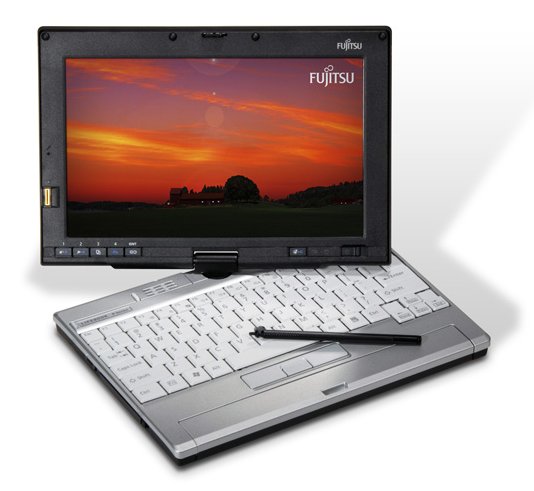
Well, I didn't spill the water. Thankfully, it wasn't my current Lenovo Thinkpad X200 Tablet PC (which has a spill-proof keyboard). It was my older Fujitsu P1610 Lifebook (which is a tiny device shaped like an UMPC and has a porous keyboard). I quickly unplugged it, removed the battery, and disassembled it to speed up the drying process. Thank goodness for online service manuals. I'll have to wait until tomorrow to see whether or not it will work. Fortunately, this device has become a recreational device (even though it is a convertible tablet PC with a passive touch screen). It's a great little computer that I used for a while, but I quickly realized that I needed a full-size keyboard to be more productive while I traveled for work. That's why I switched to the Thinkpad. I'll miss the p1610 if it dies, so I'm keeping my fingers crossed.
Monday, April 6, 2009
Downgrading from Windows 7 to XP

Looks like Microsoft XP continues to live on. According to rumors, consumers will be able to downgrade from Windows 7 to XP. Maybe the netbook version of Windows 7 will really be XP with a new skin. I still use XP on most of my machines and I run Vista on my Lenovo Thinkpad X200 Tablet PC. To be quite honest, my expectations for Windows 7 are not very high. I've been doing some beta testing and I haven't been impressed with the new OS. I hope to be pleasantly surprised, but I'm not getting my hopes up.
Thursday, March 26, 2009
Sony Vaio P

So, when will Sony add a backlit keyboard to their Vaio P series? I'm a big fan of Sony products, but I will not purchase the Vaio P unless it comes with a backlit keyboard. I'm willing to pass on a touch screen (unless we're talking about a convertible tablet), but I must insist that the device have an illuminated keyboard.
Why am I so insistent? Well, I spend a fair amount of time doing work while I'm sitting in my bed and my wife is asleep. I have a USB light that shines down on the keyboard, but this can be quite disruptive. My wife has a MacBook Pro that has a backlit keyboard and it's a great machine (but a bit too big for my uses). I like tiny gadgets - that's just who I am. I used to use my OQO model 02 (which does have illuminated keys), but that's just too small and the fan is too loud. So, I often sit in bed typing on my Lenovo Thinkpad X200 tablet and using the USB light that has a bright LED on the end.
Tuesday, March 24, 2009
Dell Adamo Laptop
So, what do you think about the Dell Adamo ultra-thin and light laptop? It looks really nice, but at $2k, it's hard to justify. Plus, a non-user replaceable battery? What's the purpose of an ultra-light mobile PC if you can't replace the battery when you run out of juice? That just doesn't make any sense to me and I think that the Apple MacBook Air has set a poor example.
I have had several Dell PCs and I even use one right now to run Mac OS X (x86 mod/hack running OS X 10.5.2). I also run Ubuntu and XP, so it's currently configured for triple-boot. I've been happy with Dell and I've recently purchased some from the Dell outlet for a small medical office practice. I think the Adamo has tremendous potential, but the lack of a removable battery is a deal breaker for me. I'l stick with my Lenovo Thinkpad X200 tablet and continue to use that until someone comes out with a battery that will last over 24 hrs.
I have had several Dell PCs and I even use one right now to run Mac OS X (x86 mod/hack running OS X 10.5.2). I also run Ubuntu and XP, so it's currently configured for triple-boot. I've been happy with Dell and I've recently purchased some from the Dell outlet for a small medical office practice. I think the Adamo has tremendous potential, but the lack of a removable battery is a deal breaker for me. I'l stick with my Lenovo Thinkpad X200 tablet and continue to use that until someone comes out with a battery that will last over 24 hrs.
Monday, March 16, 2009
Lenovo Pocket Yoga - A Touchscreen Netbook?


Looks like Lenovo is releasing a netbook-type of pocket notebook/UMPC that looks almost like the Sony Vaio P with a touch screen. Is that right? I wonder if this has a backlit keyboard (I doubt it). I imagine that the screen is a passive touch screen.
So, is this practical for healthcare professionals? Is this new innovation in technology applicable to the medical/healthcare industry? Will you see doctors carrying this device around the hospital and using it to run EHR/EMR applications? In the healthcare world, productivity is key. Therefore, you really need something that has a larger screen so that you can be efficient and productive with your time. However, if you're a doctor who takes call from home, this may be a great little gadget to carry around with you when you go out for social events (and you're on call). Imagine being at a restaurant or a party. You get a phone call from your intern/resident/patient, and you whip out your pocket notebook to look up labs, patient history, etc. Or, you use this to enter electronic orders. Either way, you can carry a full PC in your pocket. That's what made the OQO so popular among some healthcare professionals.
Friday, March 13, 2009
Lenovo Thinkpad X61 Tablet for $649

If you're looking for an incredible deal on a Lenovo Thinkpad X61 Tablet, now's the time to buy. You can get one for less than $649! I would suggest that you avoid the Lenovo Outlet, since your order may get delayed for weeks. The Thinkpad tablet is a solid machine and it has one of the best keyboards out there. It has consistenly been rated as one of the best convertible tablets out there. If you use an EHR/EMR, then you should try entering information on a tablet. You may fall in love with the pen interface and the easy ability to tap and click.
Thursday, March 5, 2009
Windows 7 Build 7048
There are more circulating rumors about Microsoft Windows 7 (in this case, it's about build 7048). Some don't seem to think that this is the Release Candidate version of Windows 7. It seems like Microsoft still has many things to fix before Windows 7 is ready for the world.
It's been refreshing to use XP on my main PC at work. I had Vista on it, but I was having so many issues that I finally decided to go to XP. I still have Vista on my Lenovo Thinkpad X200 Tablet, but that's primarily because the tablet features are so much better on Vista. Almost all those nice tablet features will also be found on Windows 7. I use the on-screen touch pointer quite a bit when I'm tapping on the screen. Otherwise, I rely on the active Wacom digitizer found on my stylus pen.
So are you excited about Windows 7? I used to have more enthusiasm, but recently that's dwindled significantly. I'd like to see Microsoft continue support for XP since it will probably still be the dominant operating system on netbooks and UMPCs (well, it will be for people who want a sleek, refined, stable operating system that takes up minimal hard drive space).
It's been refreshing to use XP on my main PC at work. I had Vista on it, but I was having so many issues that I finally decided to go to XP. I still have Vista on my Lenovo Thinkpad X200 Tablet, but that's primarily because the tablet features are so much better on Vista. Almost all those nice tablet features will also be found on Windows 7. I use the on-screen touch pointer quite a bit when I'm tapping on the screen. Otherwise, I rely on the active Wacom digitizer found on my stylus pen.
So are you excited about Windows 7? I used to have more enthusiasm, but recently that's dwindled significantly. I'd like to see Microsoft continue support for XP since it will probably still be the dominant operating system on netbooks and UMPCs (well, it will be for people who want a sleek, refined, stable operating system that takes up minimal hard drive space).
Friday, February 27, 2009
Fingerprint Laptop Security
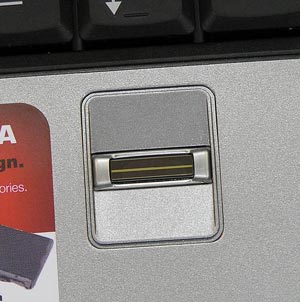
More and more business laptops, tablets, and other mobile devices have built-in biometric fingerprint scanners. They actually work amazingly well. My Lenovo Thinkpad X200 tablet has this scanner and I use it to log into Windows. I can also use this fingerprint scanner to store all my other passwords. My old tiny Fujitsu Lifebook p1610 also had a fingerprint scanner and the Samsung Q1 Ultra UMPC comes with a scanner.
Thursday, February 26, 2009
Cursed by Vista
I'm reinstalling Vista on my "mission critical" PC today. Fortunately, my Lenovo Thinkpad X200 Tablet has become a very reliable backup to my mission critical PC. Therefore, I'm mainly using my notebook for the next several days.
After reinstalling Visa and having some of the same problems, I've decided to install XP. I admit that there are days when I wonder why I'm even playing around with Vista. Will Windows 7 really be that much better? I don't want to get my hopes up.
All my friends are telling me to switch to a Mac. I've been running OS X on an old Dell laptop (OSx86) and I admit there are many features that I like. However, I'm entangled by Microsoft applications and unless I'm constanly running VMware, I wouldn't be able to survive. Am I kidding myself? As soon as the official MacTablet arrives, maybe I'll be one of those people to camp outside of the Apple store and get one (only to find that the price dropped by $300 after 2 months).
After reinstalling Visa and having some of the same problems, I've decided to install XP. I admit that there are days when I wonder why I'm even playing around with Vista. Will Windows 7 really be that much better? I don't want to get my hopes up.
All my friends are telling me to switch to a Mac. I've been running OS X on an old Dell laptop (OSx86) and I admit there are many features that I like. However, I'm entangled by Microsoft applications and unless I'm constanly running VMware, I wouldn't be able to survive. Am I kidding myself? As soon as the official MacTablet arrives, maybe I'll be one of those people to camp outside of the Apple store and get one (only to find that the price dropped by $300 after 2 months).
Subscribe to:
Posts (Atom)